

Deep music recommendation service through similar artists analysis
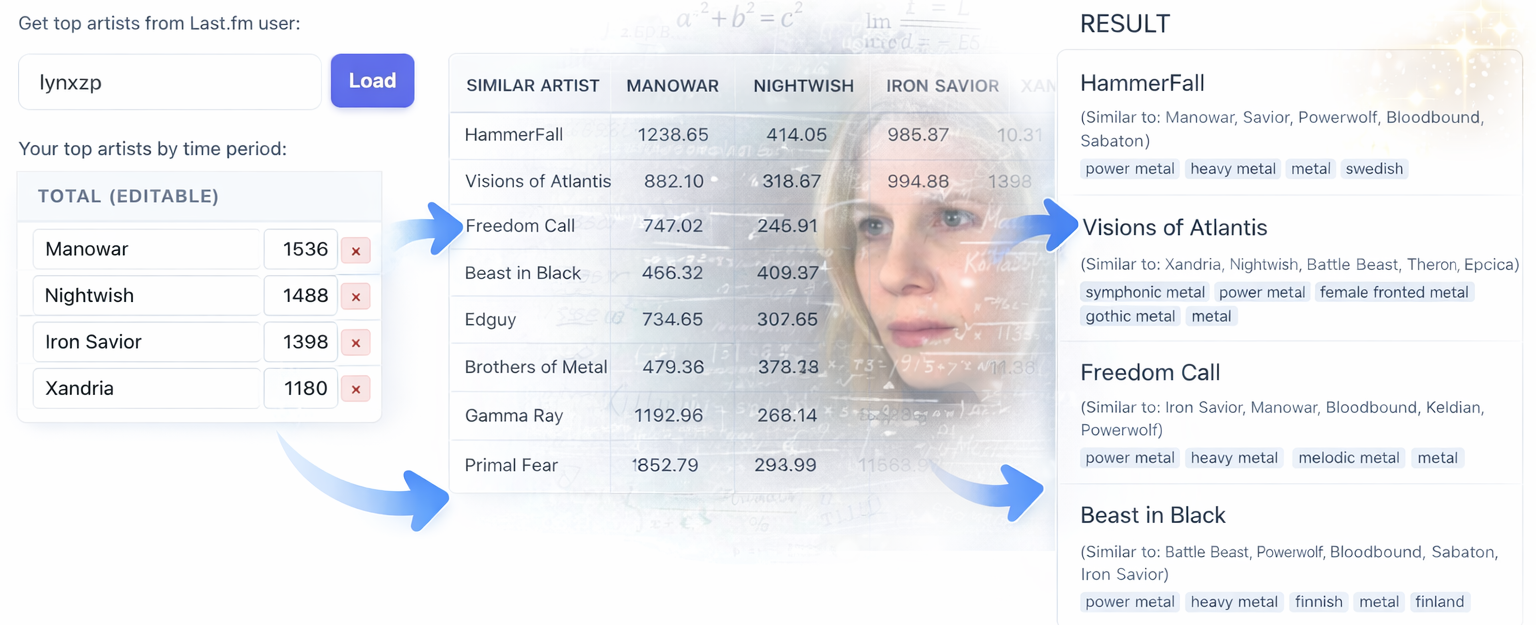
I don't like recommendations from regular music services: they're too shallow. So I wrote my own - with deep analysis and weighted scoring. The service takes top-500 artists from Last.fm (or a manually entered list), finds top-500 similar artists for each, then builds a similarity table, aggregates scores, and sorts the results. It's significantly slower, but more relevant.
https://sergua.com/music/artists-recomendations
Let's be honest. Have you seen those recommendations? In most services, in my opinion, half of the recommendations are decent, and half are garbage. Whether they're pushing whatever is more profitable for them, or there are other reasons - I don't know. But there's too much in the recommendations that you frankly don't want to listen to. I've had Indian pop show up in my recommendations, even though it's nothing but metal and hard rock for me. And the fact that recommendations differ noticeably from service to service only strengthens my belief that they're not objective. I'd been wanting to build my own for a while, and with AI now available, I finally got around to it.
How it works
First, the service extracts the user's top-500 artists for all time, for the last year, and for the last month. Then it adds these numbers together to better account for both the overall profile and current music preferences. If you want, you can manually enter a list of artists or, for the precision enthusiasts out there, edit the weights. You can even set a negative weight to suppress a style you don't want in your recommendations.
Next, for each artist from the resulting list, the service searches for top-500 similar artists. After that, it builds a similarity table: each found artist receives a score proportional to their similarity multiplied by your play count of the "reference" artist that led to them. Then all scores are aggregated, sorted, and displayed as a list of recommendations.
How to use
- Either enter your Last.fm profile name and click Load, or manually type in a list of your favorite artists.
- Optional: edit artist weights.
- Click Find - and go grab some coffee.
- Get top-100 artists sorted by total weighted similarity score. Then - enjoy the music.
Major update 2026.03.23
New features that make the service significantly more convenient:
Hiding artists from recommendations
Now there's a "hide" button next to each recommended artist. Click it - and the artist disappears from the table. This is handy when recommendations include artists you already know or have already checked out — just hide them to keep the list clean. All hidden artists are stored separately for your profile and accessible via the "Show hidden" modal, where you can bring them back. Everything is stored in the browser's local storage (works without registration, but no cross-device sync).
Besides manual hiding, as before, your top-30 artists are automatically excluded from recommendations. But now if you want to see them, you can bring them back through the same hidden artists modal.
Search parameter state persistence
The service now remembers the Last.fm profile name and edited artist list in the browser. Next time you open the page, everything will be right where you left it - no need to enter anything again.
Saving search parameters together with the hidden artists list has greatly simplified reusing the service. Just reopen the page - and everything from the previous session is still there. Listen to more artists, hit hide, and come back next time.
Play counts for recommended artists
A "Plays" column has appeared in the results table - showing how many times you've already listened to each recommended artist. This helps you understand whether you're looking at a genuinely new discovery, or an artist you already listen to from time to time but haven't paid much attention to.
Much more detail about similarity calculations
Previously, the expanded table only showed the final score. Now each cell displays the formula: weight × similarity percentage = score. And the "Similar to" line under the artist name now includes specific similarity percentages - for example, "Similar to: Metallica 85%, Iron Maiden 42%". This makes it much easier to understand why a particular artist ended up in the list.
I initially didn't want to show the details to avoid cluttering the interface. But the detailed breakdown is the whole advantage of my service. And I sometimes want to take a look myself.
Increased search depth
Previously, the search took 300 of the user's most listened artists and fetched 300 "similar" artists for each. Now the search goes up to 500. It takes longer. But I did find some quite interesting gems there. And after all, it is a "deep" search.
Softening the influence of popular artists
Previously, an artist's weight was directly proportional to their play count. Now it's calculated using the formula plays^0.8. This reduces the influence of very popular artists and increases the diversity of recommendations. Not drastically, quite gently, but it's nicer when your recommendations aren't driven solely by your top 5 favorite artists.
Thoughts for the future
It would be great to add a vector-graph visualization with clustering... I've seen a JS library for that somewhere.
Comments and questions · Google / GitHub / anonymous